When a SNAP caseworker cannot verify your income through pay stubs alone, they will ask your employer to fill out a verification form. This is routine. It is not a sign that the agency suspects you of anything. It usually means your pay stubs are missing, your employer does not issue them, or your income is irregular enough that the agency wants written confirmation directly from the source.
The form itself is short. The problems come from how long it takes to get it back, who is allowed to sign it, and what happens when the number your employer reports does not match the number you wrote on the application. This guide walks through all three.
If you are still assembling your application packet, our SNAP verification documents checklist shows where the employer form fits in the full document stack and what you can substitute if your employer refuses to sign one.
Table of Contents
- 1What the SNAP employer verification form actually asks
- 2When the form is required versus optional
- 3Who is allowed to sign the form
- 4How to get the form filled out without annoying your employer
- 5What happens if the numbers do not match
- 6What to do if your employer refuses to sign
- 7If you have more than one employer
- 8Seasonal and temporary workers
- 9What the form means for your benefit calculation
- 10Keeping the form current
- 11If you are between jobs when you apply
- 12The short version
- 13Frequently asked questions
- 14Is the employer verification form always required?
- 15Who is allowed to sign the SNAP employer verification form?
- 16What happens if my employer reports higher income than I wrote on the application?
- 17What if my employer refuses to sign the form?
- 18Wasim Akram
What the SNAP employer verification form actually asks
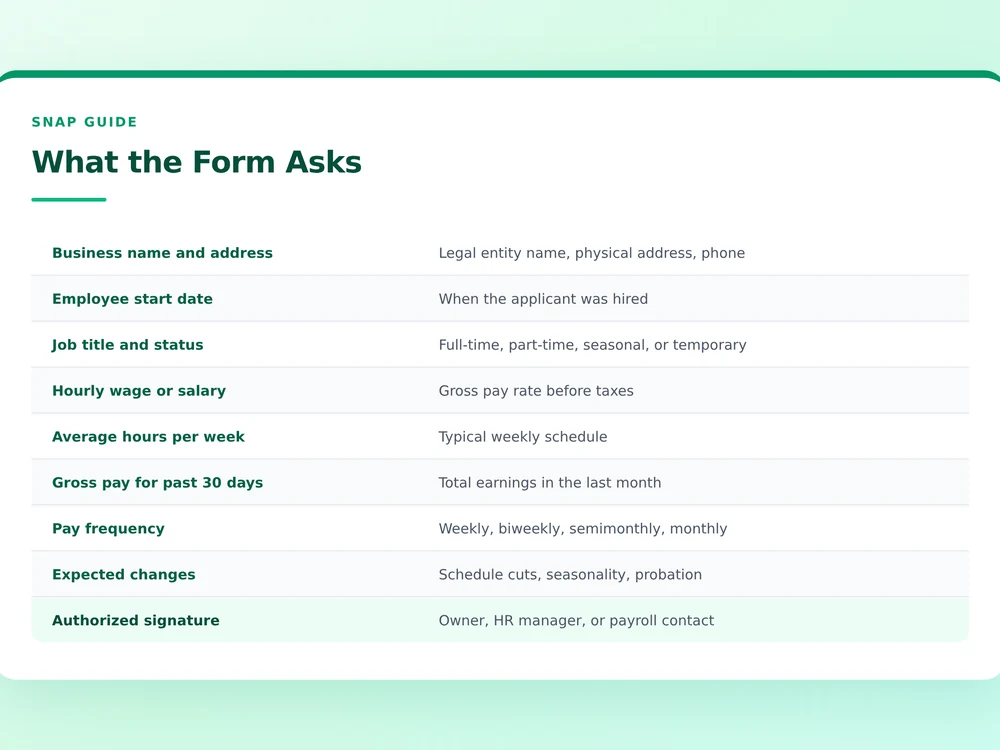
Most states use a one-page form, and the questions are predictable. The caseworker wants the employer's legal business name, address, and phone number. They want to know whether you are currently employed, your start date, your job title, whether you are full-time or part-time, your hourly wage or salary, your average hours per week, your gross pay for the past 30 days, and how often you get paid.
Some forms also ask about expected changes. Is your schedule going to be cut next month? Is your position seasonal? Are you on a probationary period? These questions exist because SNAP counts anticipated income, not just historical income. If your hours are about to drop from 35 a week to 20, the agency needs to know now, not after your next three paychecks come in lower.
The form ends with a signature line for the employer, a date, and a phone number where the agency can call to confirm the form is real. That confirmation call matters. Agencies do call employers to verify that the signature on the form actually came from someone authorized to sign.
When the form is required versus optional
Employer verification is not always required. If you have three recent pay stubs that show your name, your employer's name, the pay period, your year-to-date gross, and your year-to-date taxes withheld, most agencies accept that as sufficient proof. The stubs are considered third-party verification because they were generated by your employer's payroll system.
The form becomes necessary in a handful of situations:
- You started a new job in the past two weeks and do not have a pay stub yet.
- Your employer pays you in cash and does not issue stubs.
- Your hours vary so much week to week that 30 days of stubs do not give the agency a reliable average.
- You work for a small business that uses a handwritten ledger instead of formal payroll software.
- Your previous pay stubs are from a job you no longer hold, and the agency wants to confirm your current income.
If you fall into one of these categories, the form is not optional. Without it, the caseworker has no way to verify income, and your application will stall. The SNAP income limits page explains why this number matters so much. Even a small difference between your reported income and the actual number can move you across the eligibility threshold.
Who is allowed to sign the form
This is where most delays happen. SNAP agencies require the form to be signed by someone with authority to confirm your employment and pay. That usually means the business owner, a payroll manager, an HR manager, or an operations manager. A shift supervisor often does not count unless they have been formally designated to handle employment verification.
For small businesses, the owner signs. For franchises, the general manager of the location usually signs, but some franchises require a regional or corporate signature. For temporary staffing agencies, the agency's payroll contact signs, not the company where you actually show up to work.
If you work for a household employer, which is common for home health aides, nannies, and housekeepers, the person who pays you signs the form. This is also the case for side hustle income where you do regular work for one or two clients. Each client can sign a separate form confirming what they pay you.
How to get the form filled out without annoying your employer
Employers are not legally required to fill out SNAP verification forms. Most do, because it is a quick paperwork task and they have employees who rely on SNAP. But a busy manager can let the form sit for a week, which is a problem when your caseworker has a deadline.
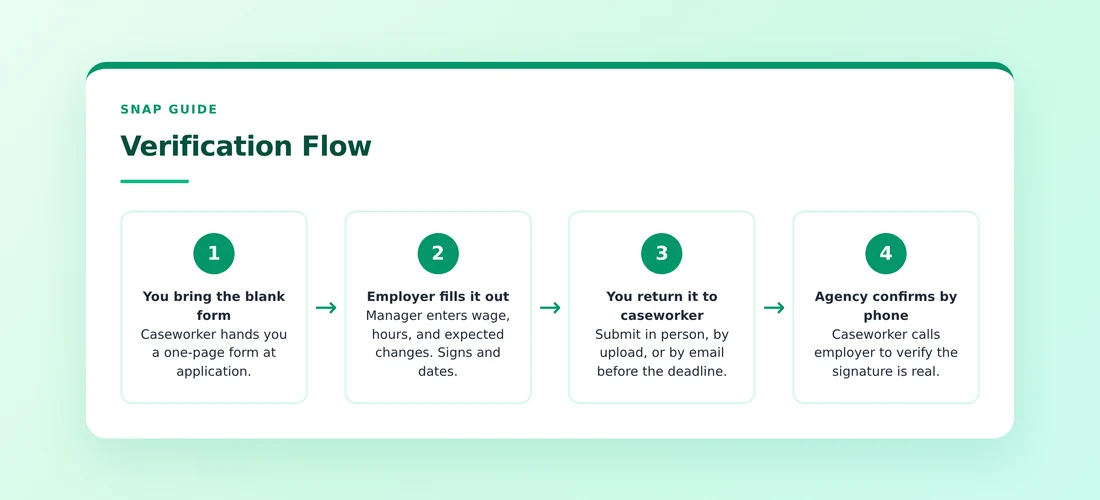
The fastest path is to bring the form in person during a slow shift. Hand it to the manager, explain that it takes two minutes, and wait while they fill it out. If you cannot do that, email the form with a short, polite message that includes the deadline. Sample phrasing:
Hi [Name], I am applying for food assistance and the agency needs verification of my employment. Could you sign the attached form and text me a photo of it? The caseworker needs it by [date]. I appreciate the help.
Most managers respond to this within 24 hours. If you have not heard back in two days, follow up in person. Do not wait a week. SNAP applications have a 30-day processing window in most states, and every day the form sits unsigned is a day your file is not moving.
What happens if the numbers do not match
This is the scenario that catches people off guard. You wrote on the application that you earn $1,800 a month. Your employer fills out the form and reports $2,100 a month. The caseworker has to use the higher number, the one from the employer, because it is considered more reliable than your self-report.
The mismatch is usually an honest mistake. You might have been counting your base pay and forgetting about a shift differential. You might have averaged the past three months without including a recent raise. You might have been estimating take-home pay instead of gross.
Whatever the cause, the caseworker will use the employer's number to recalculate your eligibility and benefit amount. If the new number still puts you under the limit, your application continues. If the new number pushes you over the limit, your application gets denied. The SNAP application denied reasons guide covers the most common denial triggers and what to do about each one.
If you believe the employer's number is wrong, you can ask for a corrected form. Some employers under-report hours because they want to help the employee qualify, which is fraud. Some over-report because they estimate based on a busy week instead of an average week. Either way, the correct fix is a new form with accurate numbers, not a verbal argument with the caseworker.
What to do if your employer refuses to sign
Some employers refuse. They might say they do not sign government forms, or that corporate policy prohibits it, or that they do not have time. SNAP agencies have heard all of these reasons before, and they have a workaround.
The standard workaround is a phone verification. The caseworker calls the employer directly, asks the same questions that are on the form, and writes the answers down in the file. Phone verification is less preferred than a signed form because there is no paper trail, but it counts as official verification in every state.
If your employer will not sign and will not take the call, you have a harder problem. You can ask the caseworker to accept alternative documentation, such as a signed letter on company letterhead stating your hire date, position, and pay rate. Some agencies accept this. Others do not. The SNAP interview guide covers what to bring to your interview when one piece of verification is missing.
In the worst case, if no employer verification is possible at all, the caseworker may have to deny the application for incomplete documentation. That denial can be appealed once you get the documentation in order. Our guide on how to reapply for SNAP after being denied walks through that path.
If you have more than one employer
SNAP counts total household income, not just income from your main job. If you work a W-2 job during the week and pick up shifts at a restaurant on weekends, both employers need to be verified. The agency does not care which one is primary. They want the sum.
For people juggling multiple gig platforms, the rule is similar but the documentation differs. Uber, DoorDash, Lyft, and Instacart all issue 1099 forms at year-end, but for current income verification, you can use the in-app earnings dashboard. Most platforms let you export a 30-day earnings summary as a PDF. That PDF plus a signed employer form from any W-2 job is usually enough.
The SNAP for gig workers page goes deeper on how platform income is counted, what deductions you can claim, and how to handle weeks where earnings swing wildly.
Seasonal and temporary workers
If you work a seasonal job, such as construction in the summer or retail during the holidays, the employer form matters in a specific way. The caseworker needs to know the expected end date of the job. If your seasonal work ends in six weeks, the agency calculates your average income over the next 12 months, not just the next 30 days, which can lower your countable income significantly.
The form has a section for this. Make sure your employer fills it out, not just the wage and hours section. A seasonal worker who earns $3,500 a month for four months and then nothing for eight months has an average monthly income of $1,167, not $3,500. That difference can be the difference between qualifying and not.
Temporary staffing agencies follow a similar logic. If the agency places you in six-week assignments with gaps in between, the form should reflect the realistic annual pattern, not just the current assignment. This is also covered in our page on SNAP eligibility after job loss, which handles the transition between jobs and how to report income when you are between them.
What the form means for your benefit calculation
The verified income number on the employer form feeds directly into the benefit formula. SNAP takes your gross monthly income, applies a standard deduction based on household size, allows additional deductions for shelter, childcare, and medical expenses for elderly or disabled members, and arrives at a net income. The benefit is then 30 percent of the gap between your net income and the maximum monthly allotment for your household size.
The SNAP benefit calculation formula page walks through this math with a real example. The short version is that a higher verified income means a lower benefit, and a lower verified income means a higher benefit, with a hard cap at the maximum allotment for your household size.
One thing the form does not affect is the deductions. Even if your employer reports higher income than you expected, you can still claim the full standard deduction, the full shelter deduction, and any medical expense deduction you qualify for. Those deductions are based on your actual expenses, not on your income.
Keeping the form current
Income verification does not end at application. If your hours change, your wage changes, or you change jobs, you are required to report the change to the agency within 10 days in most states. The agency will then ask for a new employer verification form reflecting the new situation.
This is the single most common reason people end up with a SNAP overpayment. They get a raise, do not report it, the agency finds out months later through a wage match with the state labor department, and the family is hit with a bill for benefits they were not entitled to. The SNAP overpayment notice page explains how those clawbacks work and what your repayment options are.
The safer habit is to report any income change the same week it happens. Get a new employer form filled out, submit it to the caseworker, and ask for written confirmation that the change was recorded. That paper trail protects you if there is ever a dispute later.
If you are between jobs when you apply
If you were laid off or fired within the past 30 days, the agency still wants a form from your most recent employer, even though you no longer work there. The form confirms your last wage, which the agency uses to estimate what your income would have been if you were still employed. That estimate is then offset to zero based on your current unemployment, but the historical record matters for the file.
If your previous employer refuses to sign because you no longer work there, the caseworker can accept your final pay stub as an alternative. The SNAP eligibility after job loss page covers this scenario in more depth, including how unemployment benefits interact with SNAP and when you should apply.
The short version
The employer verification form is a one-page document that confirms your job, your pay, and your expected hours. Get it filled out early, get it signed by someone with authority, and make sure the numbers on it match what you wrote on your application. If anything has changed since you applied, get a new form before the caseworker asks for one. Do those three things and the income verification step will not slow your file down.
Frequently asked questions
Is the employer verification form always required?
No. If you have three recent pay stubs showing your name, employer name, pay period, and year-to-date gross, most agencies accept that instead. The form becomes necessary when stubs are missing, pay is irregular, or you recently changed jobs.
Who is allowed to sign the SNAP employer verification form?
The business owner, payroll manager, HR manager, or operations manager. A shift supervisor usually does not count unless formally designated. For household employers like a nanny client, the person who pays you signs.
What happens if my employer reports higher income than I wrote on the application?
The caseworker must use the employer number because it is considered more reliable. If the new number still puts you under the limit, your application continues. If it pushes you over, the application gets denied and you can appeal.
What if my employer refuses to sign the form?
The caseworker can do phone verification instead, calling the employer directly. If the employer will not take the call either, ask the caseworker to accept a signed letter on company letterhead as an alternative.
Wasim Akram
Founder & Lead Researcher · Food Stamp Eligibility Calculator
Wasim Akram is an independent web publisher and digital entrepreneur with over 8 years of experience in SEO, web publishing, technical research, and building digital products. Since 2018, he has been creating niche websites, online tools, custom CMS platforms, and WordPress products. He founded Food Stamp Eligibility Calculator in 2026 after seeing firsthand how difficult it was for ordinary families to get a straight answer about whether they qualified for food assistance. Every article on this site is researched, written, and reviewed against primary government sources including USDA Food and Nutrition Service manuals, state SNAP policy manuals, the Federal Register, and official state agency guidance.